The Embedded Assistant
3forge Agent
Ask, build and investigate in plain language, right inside the 3forge application you are already working in, under your institution's controls.
Function inside the fabric
AI built into the fabric, not bolted onto it
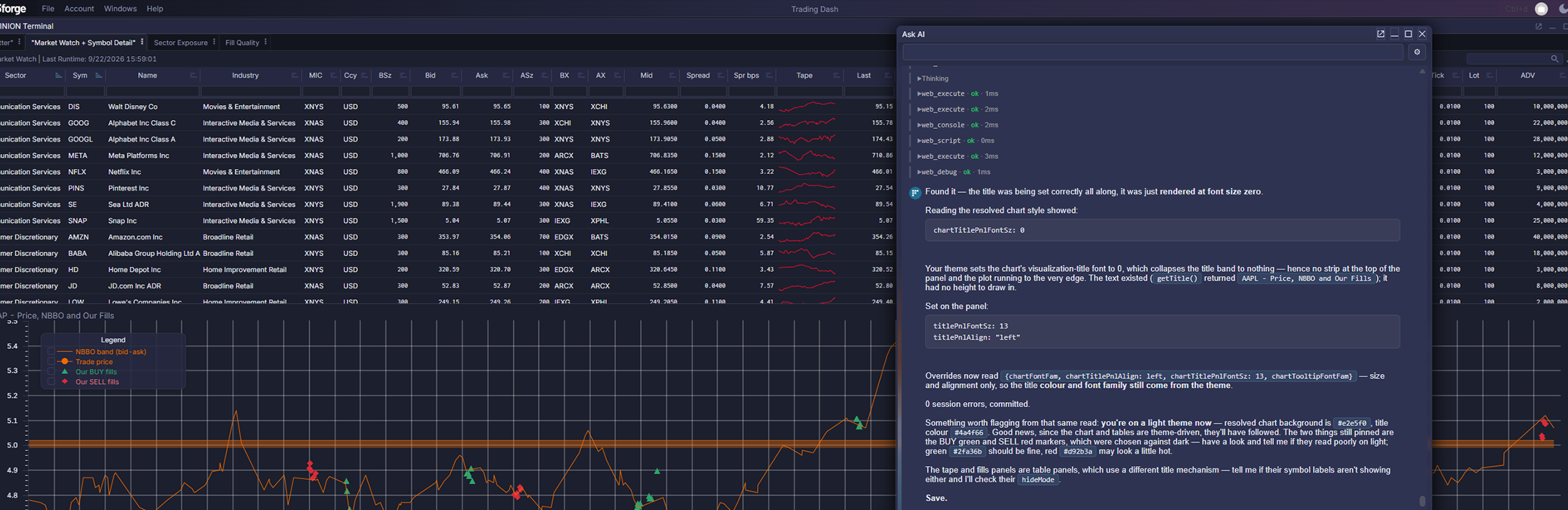
The 3forge Agent brings conversational AI directly into 3forge Web. Because it lives inside the product, users can question their data and shape their applications without ever leaving the screen they work in, or handing that data to a separate AI tool.
Capabilities
What the 3forge Agent can do
Always within each user's permissions and your institution's configuration, the Agent can:
- Answer questions in plain language, drawing on live data across the fabric
- Write and run AMI SQL queries on the user's behalf
- Work conversationally with 3forge applications and workflows
- Invoke runtime functions your institution has explicitly authorized
- Hand focused tasks to specialized platform agents
- Apply agents and instructions tailored to your own applications
- Run on the AI models and providers your institution chooses
- Pick up conversations where users left off, across sessions
Not a general assistant
How the 3forge Agent is different
Four qualities set an agent built for the fabric apart from a general assistant pointed at it.
It already knows the fabric
- Preloaded with fabric documentation, matched to the version you run
- Guided by 3forge's own instructions toward the platform's proven building blocks
- No schemas, syntax or examples to paste into a prompt
It brings in specialists
- Dedicated sub-agents for Center data and AMI SQL, for panels, scripts, logs and debugging
- Each works with a narrower context and its own permitted actions
- Delegation organizes the work; it never extends the user's authority
Your institution stays in charge
- AI is off by default
- Your institution selects the models and providers
- Administrators decide the tools, the retention and how far a request may go
Every action is scrutinized
- Every call is checked twice: first the tool, then the operation within it
- A rejected call never reaches the deployment, and the log records the agent, tool and operation
- Permissions are verified at startup against what the deployment exposes; any mismatch is logged, never granted
The execution loop
How a request runs
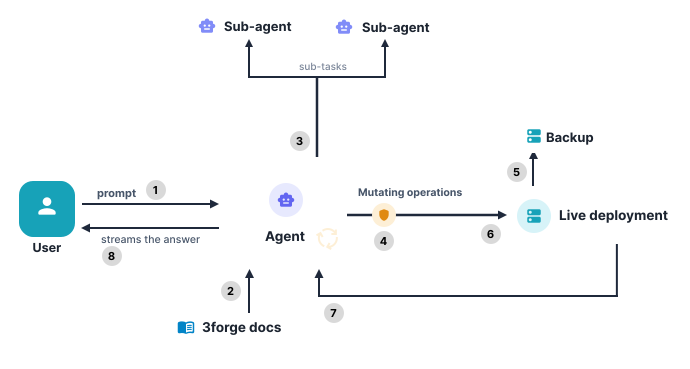
Every request follows the same disciplined path, and every step is bounded.
- The Agent receives the user's request and loads the relevant documentation
- Specialist sub-agents, for charts or the Center for example, take on focused sub-tasks
- Before anything changes, permissions are checked for every piece of data and every operation, and the layout is backed up before a live environment is touched
- The Agent refines its work within predefined boundaries
- The user receives the answer
Example usage
"Why is this table empty?"
Users can open a conversation from any panel, scoped to that panel alone. The Agent sees exactly what the user sees, and answers from the running deployment rather than from a generic description of the product.
- Every exchange is fully audited: what was asked, which operations were attempted, which failed and how the request concluded
- Estate-wide alerting, reporting and monitoring are centralized in the Operations Hub
Demonstrated at the 3forge Enterprise launch
See it build a real-time stock tracker
A trader needs a stock tracking application: live positions, a concentration heatmap, a sector view, a candlestick chart, and an event-driven workflow to reduce exposure, contact clients, route orders or escalate to risk. Behind it, prices and client data stream from Kafka and alerts sit in an SQL database, all joined in real time. Could you build that today, from a single prompt?
At the 3forge Enterprise launch, the 3forge Agent delivered the working foundation of that application in 11 minutes and 74 lines of code. Every change appeared live in the running application: no recompile, no relaunch, no refresh.
Keep reading
The Agent works inside. MCP opens the way in from outside.
Two complementary routes into the same governed runtime, under one identity and audit model.